Exhibit Details
The exhibit hall provides all companies with the opportunity to exhibit throughout the conference during several dedicated time slots with no competing sessions. This ensures ample time for networking and one-on-one conversations with facilities professionals and leaders from across the country.
All sponsorships and exhibits include access to the full conference
Floor Plan & Booth Locations

The exhibit area is located in Great Hall at Tangeman University Center, 400 Level.
Exhibitor Set-up
TUC Great Hall
10:00 a.m. - 4:00 p.m.
Sunday, May 18
The exhibit area is located in Great Hall at Tangeman University Center, 400 Level.
Vehicle Unloading
You are welcome to unload at the Tangeman University Center Loading dock, where staff will be available to assist. Once you’ve unloaded, we ask that you move your vehicle to a parking garage before returning to set up your table. Long-term parking at the dock is not available.
Tangeman University Center - Loading Dock
2701 Bearcat Way
Cincinnati OH 45219
Once on campus, you may follow these directions to the TUC Loading Dock:
- Turn onto Corry Boulevard and follow to the 3rd stop sign.
- At the 3rd stop sign look to your right and you will see a grey slate building with a clock tower, this is Tangeman University Center (TUC).
- At the 3rd stop sign continue straight into CCM Plaza, take the drive on the right down to the TUC Loading Dock. The loading dock is on your left, and the football stadium will be on your right.
On-Campus Parking
CCM Garage: $10 per day
CCM Garage is the most convenient parking option for Tangeman University Center (TUC). Once inside the garage, use the UC MainStreet entrance available on every level, and follow the 'Big 10 & Friends' signs to TUC.
For reference, a sign is posted at the MainStreet entrance on entry level—use the entrance in that same location on any level.
Please use the following address if parking on campus:
CCM Garage
CCM Blvd
Cincinnati, OH 45219
Latitude: 39.129894 | Longitude: -84.516852
Follow the outdoor Big 10 & Friends ground decals to help guide you to the venue.
Set-up
| Day | Time | Location |
|---|---|---|
| Sunday, May 18 | 10:00 a.m. - 4:00 p.m. | Tangeman University Center, Great Hall |
| Monday, May 19 | 7:00 - 8:00 a.m. | Tangeman University Center, Great Hall |
Tear-down
| Day | Time | Location |
|---|---|---|
| Wednesday, May 21 | 9:00 a.m. - 12:00 p.m. | Tangeman University Center |
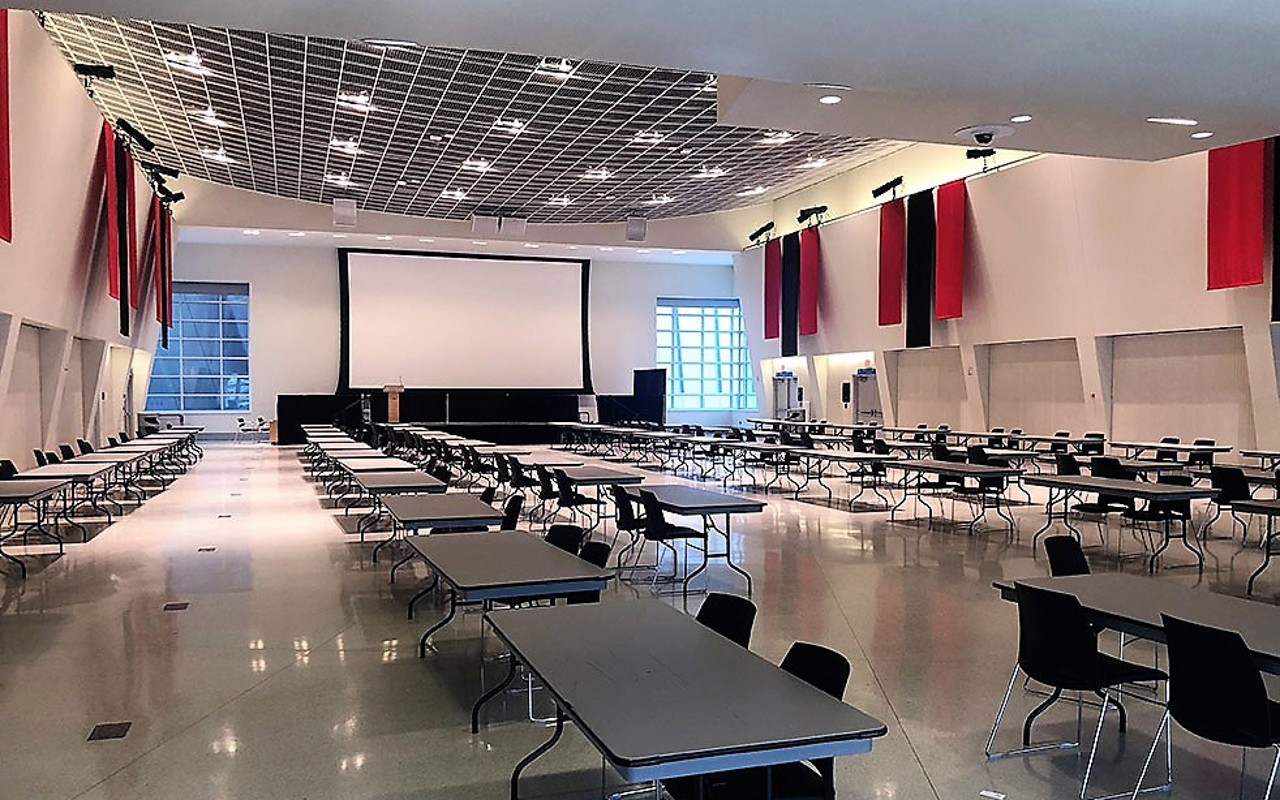
This is a smaller exhibit and ideally would be more of a tabletop display, not a large exhibit that you would see in a big exhibit hall. Here is a photo of a similar set-up to how Great Hall will be set-up for the Big 10 conference.
What's included:
- One (1) - 6’ table
- Two (2) 6' tables for Platnium & Gold level sponsorships
- Black spandex table covering
- Two (2) chairs
- Access to electrical outlets
- Wi-Fi
Packages may be delivered to the University of Cincinnati two business days prior the event. To ensure that your materials are stored and delivered properly, please include the following information on all packages:
Include on the package:
- Company & Onsite Contact Name
- Big 10 Utility Conference, May 18-21
- May 18-21
Address package as follows:
Tangeman Univ. Center - Conference & Event Services
Big 10 Utility Conf
Attn: (Company Onsite Contact Name)
2701 Bearcats Way
Cincinnati, OH 45219
If you need to ship items out after an event, all packages require a completed outgoing shipping label affixed to the box. Packaged boxes can be left on the exhibit table and building staff will take to the shipping dock.
As part of our efforts to create a fun and interactive experience for attendees, we’re excited to host a QR Code Scavenger Hunt during the event—and your participation is key!
Here’s how it works:
Attendees will be searching for 16 uniquely colored QR codes placed throughout the exhibit tables. Each exhibitor will be given a table tent with one of these QR codes.
What You Need to Do:
You have two options for displaying your QR code:
Leave it on your table:
Simply place the table tent on your table where attendees can find and scan it on their own.Hold it:
Hold onto the table tent or keep it behind your display so attendees have to engage with you to access the QR code.
When an attendee scans your QR code using the Conference App, their game progress is updated, and they get one step closer to completing the puzzle and entering to win a prize.
Download the Big 10 & Friends Guidebook App
We strongly encourage you to download the Guidebook app for the latest event updates, maps, session schedules, and more.
To download:
Search for "Guidebook" in the Apple App Store or Google Play Store.
Once installed, search for the guide titled “Big 10 Utility”
OR
Visit: from your mobile browser.
The app is updated regularly, so check back often!
Conference Schedule
*The sessions are being finalized, and we will continue to update the schedule as things are confirmed.
Each company has been allotted a number of complimentary registrations based your level of commitment. All exhibitors must register through the conference website, using the promo code provided via a previously sent email.
If you wish to bring additional staff above the allocated complimentary staff, they can register at the reduced rate of $700.00 on or before April 18.
If you need assistance with your promo code or with registering your staff, please email event.services@uc.edu
All exhibitors are responsible for booking their own hotel rooms. Rooming block information can be found here.