Schedule
The 2026 UC Digital Accessibility conference will feature workshops, panel discussions and keynotes focused on empowering participants in accessible digital ecosystems.
Overview
| Time EST | Session | Presenters | Location |
|---|---|---|---|
| 8:30am-9:00am | Check-in | - | Nippert West Pavilion 377 |
| 9:00am-9:10am | Welcome | Nicole Mayo | Nippert West Pavilion 378 |
| 9:10am-10:00am | Panel Discussion | Heidi Pettyjohn, Emily Kiehl, Larry Klug, Jessica Guess, Jacob Counts | Nippert West Pavilion 379 |
| 10:10am-11:00am | Breakout Session 1 | varies |
TUC |
| 11:10am-12:00pm | Breakout Session 2 | varies | TUC |
| 12:10pm-1:00pm | Lunch | Dean Jeffrey Bauer | Nippert West Pavilion 377 |
| 1:10pm-2:00pm | Breakout Session 3 | varies | TUC |
| 2:10pm-3:00pm | Breakout Session 4 | varies | TUC |
Panel Discussion
Kick off our Digital Accessibility Conference with a powerful conversation on disability and accessibility in higher education. Hear from panelists who live with disabilities and work in the accessibility field as they share candid, real-world perspectives from the classroom to the workforce, calling on us to move this work forward with purpose.
Panel Members: Heidi Pettyjohn, Emily Kiehl, Larry Klug, Jessica Guess, Jacob Counts

Heidi Pettyjohn
ADA & EIT Accessibility Coordinator, and Executive Director for Accessibility, Accessibility Resources
Heidi supervises four offices that provide direct accessibility and disability support to students, faculty, staff and visitors across all UC campuses. She is a member of the Student Affairs Leadership Team and co-chairs the Accessibility Network.

Emily Kiehl
Assistive Technology Instructor, Access Technology Services, Cincinnati Association for the Blind and Visually Impaired
Emily teaches nonvisual computer and phone skills that help blind people build confidence and independence. She is a UC graduate and passionate advocate for the blind community and is a leader in the National Federation of the Blind.

Larry Klug
Assistive Technology Services Instructor, Cincinnati Association for the Blind and Visually Impaired
A certified assistive technology specialist in the field for 22.5 years, Larry was diagnosed with Nystagmus, Albinism, & nearsightedness at age 3. He is a licensed bioptic driver who provides training & support to the blind & low vision community.

Jessica Guess
Counseling Program Faculty, Gallaudet University
Jessica is a counseling program faculty member in Gallaudet University. Her experiences as a late-deafened adult have allowed to focus her work, research, and advocacy (personally and professionally) on disability representation and access.

Jacob Counts
Adaptive Athletics Coordinator, Accessibility Resources, University of Cincinnati
Former collegiate wheelchair basketball player with over 25 years in adaptive sports, he won 3 national titles at Wisconsin-Whitewater & represented Team USA at the 2008 Paralympic Games. Founder of Cincinnati Dragons Youth Wheelchair Basketball.
Special Guest Speaker
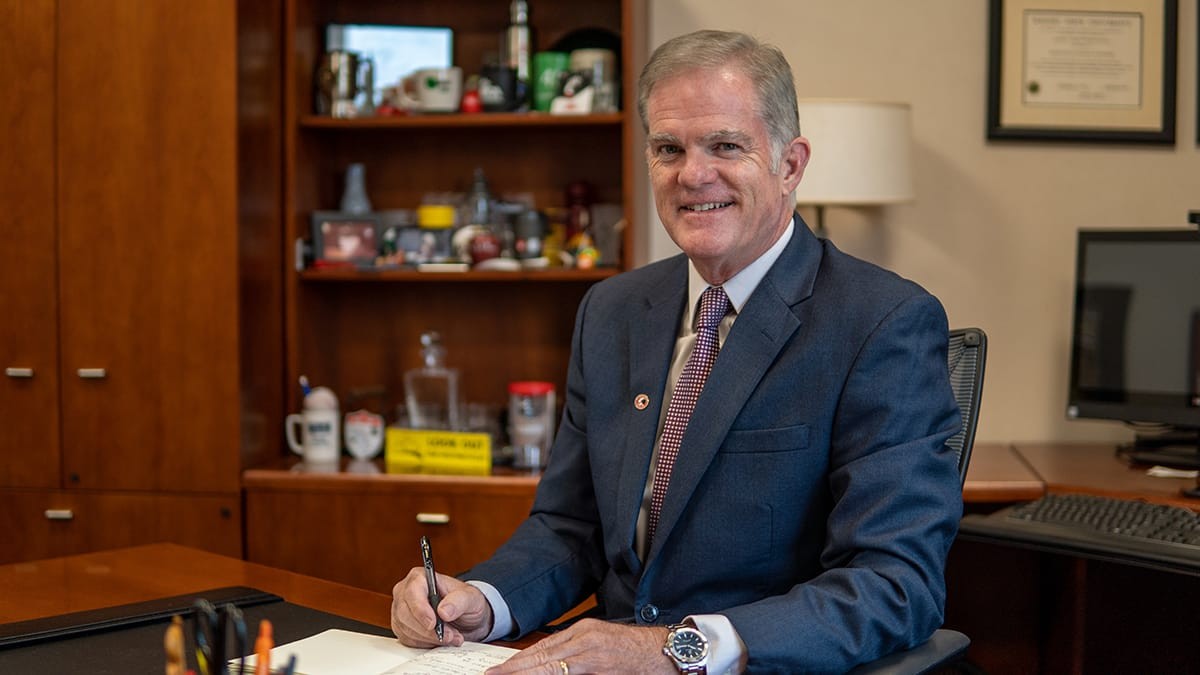
Dr. Jeffrey C. Bauer is the Dean of the University of Cincinnati’s Clermont College and Professor of Management and Marketing. He joined the faculty at UC Clermont in 1995, was named dean in 2015, and will begin his third term as dean in the summer of 2025. Dr. Bauer served as chair of the Council of Deans from 2019 - 2020 and has served on the Clermont County Chamber of Commerce Board since 2018. He began his career in industry serving in various analytical and leadership roles for 11 years and began the move to academe as an adjunct faculty member in 1993. Dean Bauer’s research interests including the microeconomic impacts of organizational design and the stages and complexities of organizational development. He is a relationship builder within the university and community and is committed to student success. Dr. Bauer earned a master’s degree in business administration from the University of Dayton and a doctorate in business administration from the University of Sarasota. His adult children Alexander and Kristina are both UC grads and he and his wife Petra Hackenberg-Bauer, M.D. have lived in Cincinnati since 1991.
Breakout Session Schedule
For descriptions of each session's content and presenter information, see Breakout Sessions Details.
| Time EST | Session | Presenters | Category | Location |
|---|---|---|---|---|
| 10:10-11:00am | Creating and Presenting Accessible PowerPoint Presentations | Kimber Andrews | Audio/Visual Media | TUC 417 |
| 10:10-11:00am | Textbook Accessibility: Current State and What We Need to Know | Mike Suit, Allison Behrmann | Academic & Instructional | TUC 425 |
| 10:10am-11:00am | Accessibility for Busy Developers | Malik Spencer, Noelle Bareswilt | Website & Application Development | TUC 400C |
| 10:10am-11:00am | Writing Effective Alternate Text for Images | Diana Riggs | Audio/Visual Media | TUC 400B |
| 10:10am-11:00am | Achieving A 90+ Ally Score | Matthew Williamson | Academic & Instructional | TUC 400A |
| Time EST | Session | Presenters | Category | Location |
|---|---|---|---|---|
| 11:10am-12:00pm | Manual Testing, Web Development (Workshop) | Manuel Salazar | Website & Application Development | TUC 400A |
| 11:10am-12:00pm | Meta Glasses Demonstration by CABVI | Emily Kiehl, Nancy Yerian | General Tools | TUC 400C |
| 11:10am-12:00pm | Accessibility with Bearcat GPT | Noelle Bareswilt, Bearcat GPT Team | General Tools | TUC 400B |
| 11:10am-12:00pm | Captioning Basics | Spencer Penrod, Marcus Goodwin | Audio/Visual Media | TUC 425 |
| 11:10am-12:00pm | Accessibility in the classroom when disabled students are the norm, not the exception. | Jessica Guess | Academic & Instructional | TUC 417 |
| Time EST | Session | Presenters | Category | Location |
|---|---|---|---|---|
| 1:10pm-2:00pm | Finding & Fixing Web Accessibility Issues with Siteimprove | Katie Lane | Website & Application Development | TUC 400B |
| 1:10pm-2:00pm | Canvas, Ally, and UDoIt OH MY! | Megan Wuebker, Ph.D. | Academic & Instructional | TUC 417 |
| 1:10pm-2:00pm | Choosing Accessible Tools | Noelle Bareswilt | General Tools | TUC 425 |
| 1:10pm-2:00pm | Achieving A 90+ Ally Score | Matthew Williamson | Academic & Instructional | TUC 400A |
| 1:10pm-2:00pm | Video Accessibility Deep Dive (Part One) | Spencer Penrod | Audio/Visual Media | TUC 400C |
| Time EST | Session | Presenters | Category | Location |
|---|---|---|---|---|
| 2:10pm-3:00pm | Textbook Accessibility by McGraw Hill Higher Education | Lisa Nicks | Academic & Instructional | TUC 400A |
| 2:10pm-3:00pm | Accessibility Glow-Up (No Redesign Required) | Sighle Denier, Zack White | Academic & Instructional | TUC 400B |
| 2:10pm-3:00pm | Writing Effective Alternate Text for Images | Diana Riggs | Audio/Visual Media | TUC 425 |
| 2:10pm-3:00pm | Panel Discussion continued, Open Forum | Jessica Guess | Academic & Instructional | TUC 417 |
| 2:10pm-3:00pm | Video Accessibility Deep Dive (Part Two) | Spencer Penrod | Audio/Visual Media | TUC 400C |
Breakout Session Details
Morning Presentations
10:10 AM
In this session, participants will gain practical guidance on designing PowerPoint presentations that meet accessibility standards and best practices for facilitating a talk, lesson or lecture using PowerPoint slides. Topics will include best practices for slide design (color contrast, font and slide layout), as well as how to use the built in accessibility checker to evaluate and improve presentations. In addition, participants will learn strategies for inclusive PowerPoint in person and virtual presentations.

Kimber Andrews
Associate Director, Center for the Enhancement for Teaching and Learning
Kimber's work for CETL includes offering professional development opportunities for faculty in the areas of accessibility, trauma informed pedagogy, and mindfulness.
In this session, we will discuss the current state of digital textbook accessibility and explore the accessible future of digital textbooks and course materials.

Mike Suit
Senior Instructional Technologist, DTS Academic Technology
Mike collaborates with faculty, staff, and athletic teams to enhance their technology experience. His expertise lies in Canvas. When he’s not at work, Mike enjoys remodeling houses and going on adventures with his family.

Allison Behrmann
Accessible Content Specialist, Accessibility Resources
A member of the Digital Access Team, Allison draws on years as a student employee to optimize student experiences. A 2025 UC graduate of the Speech Language Hearing Sciences program, Allison is studying to be an American Sign Language Interpreter.
Learn the tools, techniques, and thinking process DTS developers use to make web applications accessible. In this session we will demonstrate ways to structure your systems to make accessibility much easier.

Malik Spencer
Application Developer 2, DTS
Malik is an application developer with 20+ years of experience. As a member of UC's Accessibility Network, he shares best practices learned while developing critical systems for the university.

Noelle Bareswilt
IT Accessibility Program Director, DTS
Noelle co-chairs the Accessibility Network at UC. She champions continuous improvement in accessibility testing and review. With the AN, she drives campus-wide initiatives and develops best practices to ensure UC remains at the forefront.
They say a picture is worth a thousand words, but how does that translate to alternative text? This workshop will cover the essentials of alt text, best practices for images in common situations like course content and communications, data visualizations, and more!

Diana Riggs
Assistant Director, Accessibility Resources
Diana's work on the Digital Access Team and the Accessibility Network supports digital accessibility initiatives across campus. They lead academic accommodation services for digital class materials and support accessible technology for students.
During the workshop, we will take a Canvas course with accessibility issues and go through the step-by-step process of using the embedded tools to reach an accessibility score of 90. This session is designed to support faculty in meeting new ADA Title II requirements for digital accessibility.

Matthew Williamson, Ph.D.
Associate Director, CETL
Matthew directs efforts related to online learning and teaching. He has experience teaching college, high school, and adult learners. Beyond education, he specializes in alternative assessment, e-accessibility, and artificial intelligence.
11:10 AM

Manuel Salazar
IT Quality Assurance Analyst 2, DTS IDEAS
Manuel is an Accessibility QA Analyst with 15 years of experience. He holds a Section 508 Trusted Tester certification and has spent the last four years at UC ensuring its web platforms meet high standards of digital accessibility.
How Meta glasses have opened new doors for persons with visual impairment.

Nancy Yerian
Assistive Technology Instructor, Access Technology Services, Cincinnati Association for the Blind and Visually Impaired
Before working with Assistive Technology, Nancy worked for many years in library outreach. In both fields, she enjoys working with people one-on-one and in groups to ensure they have access to the information they need to navigate the world.

Emily Kiehl
Assistive Technology Instructor, Access Technology Services, Cincinnati Association for the Blind and Visually Impaired
Emily teaches nonvisual computer and phone skills that help blind people build confidence and independence. She is a passionate advocate for the blind community and is a leader in the National Federation of the Blind.
Noelle Bareswilt and the Bearcat GPT Team, University of Cincinnati
AI tools can play a powerful role in making digital content more accessible at the University of Cincinnati. There tools help simplify complex language, generate alt text for images, assist with captions and audio descriptions for videos, and provide guidance on accessible document formatting. Join us to learn how BearcatGPT and other AI-driven solutions combine with human insight to provide valuable support in ensuring content is usable by everyone.

Noelle Bareswilt,
IT Accessibility Program Director

Spencer Penrod
Digital Accessibility Specialist, Accessibility Resources
Spencer has been a member of the Digital Access Team for 2 years. He leads and specializes in the Captioning of Pre-Recorded media. As a part of the Accessibility Network he prioritizes video accessibility, training, and best practices.

Marcus Goodwin
Digital Access Program Coordinator, Accessibility Resources
Marcus supports initiatives that promote equitable access to digital tools and resources. He serve as a key point of contact for captioning requests and collaborates across departments to enhance accessibility and the student and employee experience.
Having a few disabled students requiring accommodations is typical, but what if disabled students were the norm? Are you curious about how to set up an accessible classroom for online courses when at least 75% of enrolled students have a disability? This requires general accessibility to be a large part of planning and course development. This workshop will share tips and processes for teaching and prep that are used at Gallaudet University in Washington, DC where typically 75% of students have a disability of some kind.

Jessica Guess
Counseling Program Faculty, Gallaudet University
Jessica is a counseling program faculty member in Gallaudet University. Her experiences as a late-deafened adult have allowed to focus her work, research, and advocacy (personally and professionally) on disability representation and access.
Afternoon Presentations
1:10 PM
Join us for a hands-on session designed to help web authors build confidence using Siteimprove, an all-in-one digital optimization tool that helps improve website accessibility, quality, and performance. We’ll walk through how to use Siteimprove—including its accessibility plugin—to check your pages for accessibility issues directly within our content management system. You’ll learn which issues to prioritize, how to address them, and how to verify that your fixes are effective.

Katie Lane
Assistant Director, Digital + User Experience, Marketing + Communications
Katie works in UC's central MarComm office and is a member of the Accessibility Network. She specializes in website content organization and user experience. F Katie prioritizes creating user-friendly, accessible content for all audiences.
This session will provide a comparison of the two accessibility tools integrated into Canvas: Ally and UDOIT. Each tool provides users with different ways to assess the accessibility of their Canvas content.

Megan Wuebker, Ph.D.
Computer & Information Analyst, DTS Academic Technologies
Megan works with faculty and staff to assess, acquire, test, and integrate tools into the university's learning management system. As a member of the Accessibility Network, Megan co-develops course content training and professional development.
Noelle Bareswilt,
IT Accessibility Program Director
During the workshop, we will take a Canvas course with accessibility issues and go through the step-by-step process of using the embedded tools to reach an accessibility score of 90. This session is designed to support faculty in meeting new ADA Title II requirements for digital accessibility.

Matthew Williamson, Ph.D.
Associate Director, CETL
Matthew directs efforts related to online learning and teaching. He has experience teaching college, high school, and adult learners. Beyond education, he specializes in alternative assessment, e-accessibility, and artificial intelligence.
Making videos accessible can go beyond just captioning your videos. This session will provide information on how to provide accessible materials, regarding captions, transcripts, and audio descriptions, by helping identify when these elements are necessary, what they could look like, and how to implement them when creating your content.
Spencer Penrod,
Digital Accessibility Specialist
2:10 PM
Lisa Nicks, McGraw Hill Education
With the ADA Title ll deadline approaching, universities are required to make sure web content and other digital assets are accessible. This session will explain Title ll and how it impacts higher education. We will also cover how McGraw Hill is preparing for Title ll and how we can collaborate with your faculty and staff.
Accessibility Glow-up is an informative session about making an existing Canvas course's content accessible. The presentation consists of an Accessible Content Overview and Accessible Canvas Course step-by-step demonstration. Participants will also receive resources to share at the end of the session.

Sighle Denier
Director of Instructional Design and Technology, College of Allied Health Sciences
Sighle is the Accessibility Liaison for CAHS and leads the strategy for digital accessibility at CAHS. She has 40+ years of experience in technology and instructional design across corporate and academic environments.

Zack White
Instructional Technologist 1 (IDATS), College of Allied Health Sciences
Zack has 10 years of experience in the technology sector, specializing in digital accessibility and content optimization. He supports CAHS in advancing accessible learning materials with a focus on document remediation and compliance best practices.
They say a picture is worth a thousand words, but how does that translate to alternative text? This workshop will cover the essentials of alt text, best practices for images in common situations like course content and communications, data visualizations, and more!
This session covers the same content as the morning session with the same title.
Diana Riggs,
Assistant Director
Join us for an open forum discussion with the panelists.
Jessica Guess,
Counseling Program Faculty
Emily Kiehl,
Assistive Technology Instructor, Access Technology Services
Jacob Counts,
Adaptive Athletics Coordinator
Heidi Pettyjohn,
ADA & EIT Accessibility Coordinator, and Executive Director for Accessibility
Larry Klug,
Assistive Technology Services Instructor
Making videos accessible can go beyond just captioning your videos. This session will provide information on how to provide accessible materials, regarding captions, transcripts, and audio descriptions, by helping identify when these elements are necessary, what they could look like, and how to implement them when creating your content.